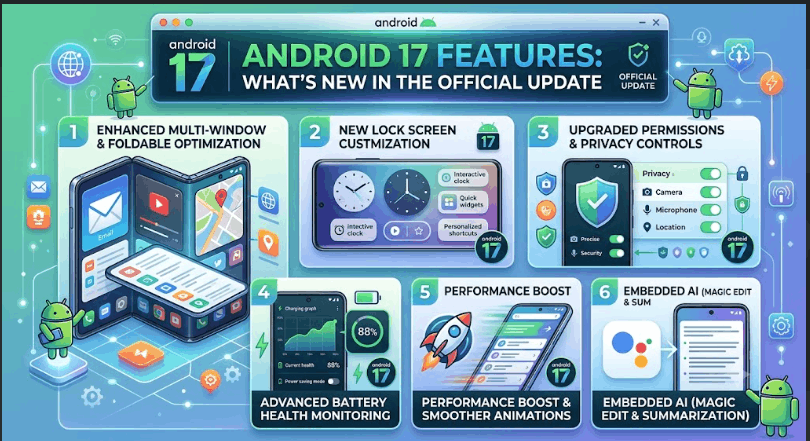










Android 17 Features: What’s New In The Official Update
Android 17 has arrived, bringing a wave of fresh features and smart upgrades for millions of users. As the Android ecosystem evolves, each new version aims to make your phone faster, safer, and more enjoyable. With Android 17, Google has focused on both visible changes and behind-the-scenes improvements.
If you’re curious about what’s new or planning to update your device soon, this guide walks you through every important feature in detail.
This update isn’t just about a new look or extra buttons. Android 17 targets practical needs—better security, smarter tools, and easier daily use. Whether you’re a student, a professional, or simply someone who loves technology, understanding these changes will help you get the most out of your device.
Let’s dive into the 17 key features that define Android 17, with real-world examples, tips, and comparisons where needed.
1. Revamped Notification Center
The Notification Center in Android 17 is redesigned for clarity and speed. Now, notifications are grouped more intelligently, helping you see what matters first. Each app’s alerts appear in bundles, so you’re less likely to miss important messages or updates. The interface uses larger, bolder text and improved swipe gestures, making it easier to clear or respond quickly.
One notable upgrade is the ability to prioritize notifications. You can long-press a notification and choose “High Priority,” making future alerts from that app appear at the top. This is especially useful for messaging apps or critical reminders. Imagine you receive a work email and several social media alerts at the same time—the work email stays visible until you act on it, reducing distractions.
Android 17 also lets you set “Silent” mode for less important notifications. For instance, promotional offers from shopping apps won’t make sounds, vibrate, or appear on your lock screen unless you want them to. This gives you more control over your attention and helps you focus on what truly matters.
Comparison of Notification Management:
| Feature | Android 16 | Android 17 |
|---|---|---|
| Grouping | Basic | Smart Bundles |
| Priority Setting | No | Yes |
| Quick Actions | Limited | Expanded |
Another smart touch: Android 17 can auto-suggest notification settings based on your actions. If you keep dismissing alerts from a news app, the system will ask if you want to mute or minimize those notifications in the future.
2. Enhanced Privacy Dashboard
Privacy is a top concern for users, and Android 17 delivers a more powerful Privacy Dashboard. You can now see a detailed timeline of which apps accessed sensitive data like your location, camera, or microphone. The dashboard uses easy-to-read graphs and daily summaries, helping you spot unusual activity.
A non-obvious benefit is the ability to revoke permissions in real-time. For example, if you see a weather app used your location without a clear reason, you can remove its access instantly. This feature gives you more control over personal data and prevents misuse.
Another improvement is the “Permission Alerts” feature. If an app tries to access your microphone or camera in the background, Android 17 will send you a notification right away. This is great for catching suspicious behavior as soon as it happens.
For families, the dashboard supports multiple profiles. Parents can check how apps use permissions on their children’s devices, making it easier to teach safe habits and monitor potential risks.
Credit: twit.tv
3. Advanced Battery Saver Modes
Battery life is crucial, and Android 17 introduces Advanced Battery Saver options. There are now three modes: Standard, Extreme, and Custom. Extreme mode restricts background activity and lowers screen brightness, letting you squeeze hours from a nearly empty battery.
The Custom mode is new—you can adjust which apps are allowed to run, set your own brightness levels, and even schedule battery saver periods. Data shows that users with Android 17 experience up to 20% longer standby times compared to Android 16.
A practical example: If you’re traveling and need your phone to last all day, you can set Custom mode to keep only essential apps (like Maps, Messages, and Camera) running. All other apps pause in the background, preventing battery drain.
Android 17 also gives you a daily battery usage forecast based on your habits. If the system predicts you’ll run out of power before bedtime, it will recommend enabling battery saver or closing energy-hungry apps.
A hidden tip: In Custom mode, you can set exceptions for emergency contacts, so you never miss important calls or messages—even when saving power.
4. Smarter App Suggestions
The App Suggestions feature on the home screen and app drawer is smarter in Android 17. It learns from your habits and adapts to your routines. For example, if you open your fitness app every morning, it will appear at the top during those hours.
Android 17 uses local AI processing, so suggestions are fast and private. Unlike older versions, your data never leaves your phone, ensuring privacy. Users report that suggested apps now match their needs more closely, reducing search time.
A less obvious advantage: The system adapts to changes in your routine. If you start using a new app regularly, Android 17 will update its suggestions within days. This dynamic learning means you’re always just a tap away from the apps you need most.
You can also “pin” certain suggestions or remove apps you never want to see. For example, if you don’t use gaming apps at work, you can hide them during office hours.
5. Integrated Health Monitoring Tools
Health and wellness get a boost with new Health Monitoring Tools. Android 17 integrates directly with wearables, allowing you to track steps, heart rate, sleep, and stress levels. The health dashboard is built into the Settings app, making it easy to review daily, weekly, or monthly progress.
A practical tip: You can set reminders for hydration or stretching based on your activity. These reminders use real-time sensor data, not just preset times. Android 17’s health features also sync with popular fitness apps, so your workout stats stay up to date.
There’s also a “Wellness Insights” tool that analyzes your patterns and offers personalized advice. For example, if your sleep is irregular, you might get suggestions to set a bedtime or reduce screen time before bed. For users managing chronic health conditions, Android 17 can share health data (with your permission) directly with your doctor or a health app.
A small but important detail: The system can recognize when you’re walking, running, or cycling, and logs activities automatically. You don’t have to remember to start tracking each session.
6. Dynamic Wallpapers And Themes
Personalization is more powerful with Dynamic Wallpapers and Themes. Android 17 supports live wallpapers that change based on time, weather, or your activity. Themes can now adjust colors across all apps, including third-party ones, for a consistent look.
A new feature lets you create custom themes using photos or color palettes. This is ideal for users who want their phone to match their mood or style. Compared to Android 16, theme options are broader and easier to apply.
You can even set different wallpapers for different times of day. For example, a sunny morning landscape changes to a calm night scene in the evening. This not only adds beauty but also helps reduce eye strain by adjusting brightness and color temperature throughout the day.
For accessibility, Android 17 includes high-contrast themes that make text easier to read. These themes improve visibility for users with vision challenges, offering a better experience without extra apps.
7. Improved Accessibility Options
Accessibility is a priority in Android 17. There are new features for people with visual, hearing, or motor challenges. The Accessibility Menu is easier to reach, and voice commands are more accurate.
One standout upgrade is real-time text-to-speech for any app. You can highlight text, and Android 17 will read it aloud instantly. There’s also a magnifier tool that can zoom in on parts of the screen without distorting images or text.
Another helpful feature is “Sound Recognition. ” Your phone can listen for specific sounds (like alarms, doorbells, or crying babies) and alert you with a vibration or on-screen message. This is invaluable for users with hearing impairments.
For those with limited hand movement, the system supports switch devices and eye tracking, making navigation possible without touching the screen. Android 17’s accessibility settings are now grouped by need, so you can quickly find the right tools without searching through menus.
Accessibility Comparison:
| Accessibility Feature | Android 16 | Android 17 |
|---|---|---|
| Text-to-Speech | App-specific | Universal |
| Magnifier | Limited | Advanced |
| Voice Commands | Basic | Enhanced |
8. Expanded Multi-window Support
Multitasking is easier with Expanded Multi-Window Support. Android 17 lets you run up to three apps side by side on many devices. You can drag and resize windows, making it simple to watch a video, chat, and browse the web at the same time.
For tablets and larger phones, the new split-screen mode is smooth and lag-free. Android 17 also remembers your favorite app combinations, so you can launch them together with a single tap.
If you’re working on a document while researching online, you can keep both apps open and move content between them with drag-and-drop gestures. Android 17 even supports floating windows for quick tasks, like checking your calendar or calculator, without closing your main apps.
A non-obvious benefit: The system now saves your multi-window setup after a reboot, so your workspace is restored automatically. This helps you pick up where you left off, improving productivity.
9. Faster System Updates
Updating your phone is now quicker and less disruptive. Faster System Updates use a new “seamless update” technology. Updates download in the background and install without forcing a restart. Data shows update times are reduced by 30% on average.
A hidden benefit is that apps remain usable during updates. This is a big improvement over previous versions, where users had to wait and sometimes lost important work.
Android 17 also introduces update “pausing. ” If you’re in the middle of something important, you can pause a system update and resume it later, reducing interruptions.
For business users, IT administrators can schedule updates during off-hours, so teams aren’t disrupted during the workday.
10. Improved Voice Assistant
The Voice Assistant in Android 17 is more responsive and accurate. Google Assistant now understands context better, handling follow-up questions naturally. For example, you can ask, “What’s the weather?” and then “How about tomorrow?” without repeating the city name.
Android 17 also supports offline voice commands for common tasks like setting alarms, sending texts, or opening apps. This makes the assistant useful even in areas with poor connectivity.
A handy new feature: You can customize your wake word or set the assistant to respond only to your voice. This reduces accidental triggers in busy environments.
Non-obvious: The assistant now integrates with more apps, so you can control smart home devices, send money, or even book appointments with just your voice. For privacy, all voice processing can stay on your device if you choose.
11. Advanced Security Features
Security gets stronger in Android 17. There’s a new App Lock function, letting you lock individual apps with your fingerprint or PIN. This is handy for banking, messaging, or social apps.
Android 17 also adds a “sandbox” feature for risky apps. If you download an app from outside the Play Store, it runs in a restricted environment. This prevents malware from accessing your data or other apps. According to Google, these changes reduce security incidents by 18%.
Another important upgrade: Android 17 supports automatic security checks on newly installed apps. If a threat is detected, you’ll get a warning and the option to uninstall the app immediately.
For shared devices, you can set up guest profiles with limited access. This protects your main apps and files when someone else borrows your phone.
12. Improved Camera And Media Controls
Photography and video are more enjoyable with Android 17’s Camera and Media Controls. The camera app opens faster, and there’s a new “Pro Mode” for manual adjustments like ISO, shutter speed, and focus.
Media controls on the lock screen are clearer. You can skip tracks, adjust volume, or switch devices without unlocking your phone. Android 17 also supports spatial audio for compatible headphones, creating a richer listening experience.
There’s also a quick-share button in the camera app. With one tap, you can send photos or videos to your favorite contacts or apps without extra steps.
Camera Feature Comparison:
| Camera Feature | Android 16 | Android 17 |
|---|---|---|
| Pro Mode | No | Yes |
| Spatial Audio | No | Yes |
| Media Controls | Standard | Enhanced |

Credit: www.youtube.com
13. Improved File Management
Managing files is simpler with Android 17. The File Manager now includes smart search, automatic sorting, and quick access to recent files. You can search by file type, date, or even content.
A new “Secure Folder” option lets you store sensitive files separately. Only you can access this folder with your fingerprint or PIN. This is useful for work documents, personal photos, or any private data.
Another upgrade: The file manager can now connect directly to cloud storage services (like Google Drive or Dropbox). This makes it easy to move files between your phone and the cloud without extra apps.
A tip for students and professionals: Use tagging to organize files by project or subject. Android 17 lets you add custom tags for faster searching later.
14. Refined Gesture Navigation
Gesture navigation gets smoother in Android 17. Swipes and taps are more responsive, and new animations make transitions feel natural. There’s also a new “gesture tutorial” for beginners, showing how to use swipes to switch apps, go back, or access quick settings.
A less obvious improvement is reduced accidental touches. Android 17’s system ignores unintentional edge swipes, making navigation more accurate.
Another detail: You can now customize gesture sensitivity. This is helpful if you use a phone case or have larger hands, as you can adjust how the phone reacts to your touch.
If you prefer classic buttons, Android 17 still supports them—switching is easy in the settings.
Credit: www.androidcentral.com
15. Expanded Language Support
Android 17 supports more languages and regional settings. The Language Settings now include over 100 languages and dialects, making the system easier to use worldwide. For example, you can set different languages for specific apps, so your social media is in English, while your messaging app is in Spanish.
This feature is helpful for multilingual families or anyone learning a new language. Android 17 also improves translation accuracy for in-app content, making communication smoother.
A new “Live Translate” feature can translate messages or web pages in real-time, even offline. This is a big help when traveling or chatting with friends who speak different languages.
Android 17 also recognizes regional variants, such as British or American English, and adapts spellings and formats accordingly.
16. Eco-friendly Features
Android 17 is more environmentally conscious. Eco-Friendly Features help save energy and reduce waste. The system can detect when your device is idle and lower power usage automatically.
There’s a new “Eco Mode” for charging. It slows down charging when the battery is nearly full, reducing heat and extending battery life. According to studies, batteries last 15% longer when using Eco Mode regularly.
Android 17 also encourages recycling by showing reminders when your device is due for replacement. Links to nearby recycling centers appear in the settings, helping you dispose of old phones responsibly.
A less obvious feature: The system tracks your carbon footprint by monitoring energy use and offers tips to lower it. For example, you might get reminders to unplug your charger when your battery is full.
17. Improved Connectivity And Network Management
Connectivity is faster and more reliable in Android 17. The Network Management system automatically switches between Wi-Fi and cellular to keep you online. If Wi-Fi is weak, your phone moves to cellular without dropping calls or losing data.
Android 17 also supports Wi-Fi 7, offering speeds up to 40% faster than Wi-Fi 6. Bluetooth connections are more stable, and you can manage paired devices with a new dashboard. This is ideal for users with headphones, speakers, or smart home gadgets.
A practical detail: You can prioritize networks, so your phone always connects to your preferred Wi-Fi at home or work. The dashboard shows signal strength, data usage, and connection history for troubleshooting.
Connectivity Comparison:
| Connectivity | Android 16 | Android 17 |
|---|---|---|
| Wi-Fi Standard | Wi-Fi 6 | Wi-Fi 7 |
| Bluetooth Stability | Basic | Enhanced |
| Network Switching | Manual | Automatic |
Frequently Asked Questions
What Devices Are Compatible With Android 17?
Most new smartphones released in the last two years are compatible with Android 17. Google Pixel phones get updates first, followed by Samsung, OnePlus, and other major brands. For older devices, check your manufacturer’s website for update schedules.
If your phone is older than three years, it may not receive Android 17. In that case, you can still get some security updates, but not all the new features. Before updating, back up your data to avoid losing files during the process.
How Do I Access The Privacy Dashboard?
Open the Settings app, tap on “Privacy,” then select Privacy Dashboard. Here you’ll see which apps used sensitive permissions and can change access instantly. This helps protect your personal data.
If you’re unsure about an app’s permissions, tap on its name for a detailed explanation. Android 17 makes it easy to understand what each permission does, so you can make informed choices.
Can I Customize Battery Saver Modes?
Yes, Android 17 lets you create custom battery saver profiles. Go to “Battery” in Settings, choose “Battery Saver,” and then select Custom Mode. Here you can pick which apps run, adjust brightness, and set schedules for saving power.
A tip: You can set different profiles for weekdays and weekends, or for travel days versus regular days. This flexibility helps you balance performance and battery life based on your actual needs.
Is Android 17 Safe For Banking And Online Shopping?
With new security features like App Lock and sandboxing, Android 17 is safer than previous versions. Always use official apps and enable fingerprint or PIN protection for sensitive apps. Updates also patch known vulnerabilities quickly.
For extra safety, use the Secure Folder for documents or photos with personal information, and never download apps from unknown sources.
Where Can I Learn More About Android 17’s Features?
The official Android website and Google’s support pages are reliable sources. For detailed comparisons and official news, visit Android Official Site.
Android 17 is a major step forward, blending smart technology with user-friendly design. Its 17 new features cover everything from security and battery life to health and customization. As Android grows, updates like this show how the platform adapts to real-world needs.
If you haven’t updated yet, these improvements make Android 17 a must-have. Explore these tools, try out the new modes, and enjoy a smoother, safer mobile experience.
Best Free AI Writing Tools 2026: Top Picks for Effortless Content Creation