










Top 10 AI tools for productivity Effortlessly
Every day, people look for ways to work smarter, not harder. In today’s fast-moving world, AI tools have become real game-changers. They help us finish tasks faster, organize our time better, and focus on what matters most. But with hundreds of options out there, which AI tools truly boost your productivity? Let’s look closely at the top 10 AI tools that can help you get more done, save time, and make your daily routine easier.
1. Chatgpt
ChatGPT is one of the most popular AI-powered chatbots right now. Created by OpenAI, it can answer questions, write emails, summarize articles, and even help brainstorm ideas. Many people use ChatGPT as a virtual assistant for daily tasks. For example, if you need to draft a business email quickly, just tell ChatGPT what you want to say, and it will write a clear message in seconds.
ChatGPT stands out because it understands context and adapts its style. This means your responses sound human—not robotic. You can use it on the web or with mobile apps, making it easy to access wherever you are. One non-obvious tip: Try using ChatGPT to explain complex topics in simple terms. It’s like having a patient teacher with you 24/7.
2. Notion Ai
Notion AI is an extension of the popular Notion workspace app. It’s designed to help you organize notes, manage projects, and automate writing tasks. Notion AI can summarize meeting notes, turn bullet points into full paragraphs, and even create to-do lists based on your notes.
A key advantage is the way it works inside your workspace. You don’t have to switch apps—Notion AI sits right where you work. For example, after a long meeting, just ask Notion AI to pull out action items from your notes.
It saves time and reduces mistakes. Many users miss that Notion AI can also rewrite or improve your writing style, which is a great way to make your reports look more professional.

Credit: www.atlassian.com
3. Grammarly
If you write emails, reports, or social media posts, Grammarly is a must-have. This AI-powered tool checks your grammar, spelling, and punctuation in real-time. But it also does more: Grammarly can suggest better word choices, check for tone, and ensure your writing is clear.
Grammarly is available as a browser extension, desktop app, and mobile keyboard. It’s especially useful for non-native English speakers who want to sound more natural. For example, if you write “I look forward to hear from you,” Grammarly will suggest “I look forward to hearing from you.
” This kind of feedback helps you improve over time.
One insight: Grammarly also checks for plagiarism, which is useful for students or anyone writing original content. It’s easy to overlook this feature, but it can save you from serious trouble.
4. Otter.ai
Otter.ai transforms spoken words into written text. It’s perfect for people who attend meetings, interviews, or lectures. Simply record the conversation, and Otter.ai creates a transcript almost instantly. This is much faster than taking notes by hand.
Otter.ai can identify different speakers and highlight important points. You can search transcripts to find information quickly. For team meetings, share the transcript so everyone stays informed—even if they missed the meeting. A hidden benefit: Otter.ai can connect with Zoom or Google Meet, capturing live meetings automatically.
Here’s a quick comparison to see how Otter.ai stands out:
| Feature | Otter.ai | Manual Note-Taking |
|---|---|---|
| Speed | Instant | Slow |
| Speaker Identification | Automatic | Manual |
| Searchable Notes | Yes | No |
5. Trello + Butler Ai
Trello is a visual project management tool. With the addition of Butler AI, it becomes even more powerful. Butler is an automation tool that works inside Trello. It can move cards, set reminders, and assign tasks automatically—saving you from repetitive work.
For example, if you move a card to “Done,” Butler can notify your team, archive the card, or even create a follow-up task. You set the rules, and Butler does the rest. This kind of automation cuts down the time spent on project management and reduces errors.
One thing many users miss: Butler can analyze your activity and suggest automations you might not have thought of, helping you work smarter as your projects grow.
6. Google Bard
Google Bard is Google’s AI chatbot. It’s designed for quick information search, generating text, and helping you brainstorm ideas. Bard connects with Google Search, so it can find up-to-date data, facts, and examples. If you need to compare two products, summarize an article, or generate content ideas, Bard can do it in seconds.
A unique feature is its integration with other Google apps. For instance, you can ask Bard to create a summary and send it directly to your Google Docs or Gmail. Few people realize Bard can also write code snippets or explain technical concepts, which is handy for both students and professionals.
Below is a quick look at how Bard compares to ChatGPT for basic tasks:
| Task | Google Bard | ChatGPT |
|---|---|---|
| Latest Information | Yes (live search) | Limited (depends on version) |
| Google App Integration | Yes | No |
| Code Generation | Yes | Yes |
7. Zapier
Zapier is an automation tool that connects different apps and services. Instead of doing the same task over and over, you can set up “Zaps” that automate your workflow. For example, if you get a new email in Gmail, Zapier can automatically save the attachment to Google Drive and send you a notification on Slack.
Zapier supports over 5,000 apps, including Trello, Asana, and Microsoft Teams. This makes it a great choice for teams and individuals who use many tools every day. One non-obvious benefit: You can use multi-step Zaps to automate even complex processes. This can save hours each week, especially for businesses.
8. Motion
Motion is an AI-powered calendar and task manager. It automatically plans your day by scheduling meetings, tasks, and breaks. If your meeting runs late, Motion updates your calendar in real time. This keeps you organized and helps you focus on important work.
Motion also suggests the best time for deep work, so you can concentrate without distractions. Many users miss the “auto-scheduling” feature: if you add a new task, Motion finds the best spot in your calendar, so you don’t have to rearrange things manually.
Here’s how Motion compares to a regular calendar app:
| Feature | Motion | Standard Calendar |
|---|---|---|
| Auto-Scheduling | Yes | No |
| AI Suggestions | Yes | No |
| Task Management | Integrated | Basic |

Credit: zapier.com
9. Jasper Ai
Jasper AI is a content creation tool that helps you write articles, ads, social media posts, and more. It uses advanced AI to generate content based on your input. If you run a blog or manage social media, Jasper AI can help you create high-quality content faster.
One advantage is Jasper’s many templates. You can choose a template for blog posts, product descriptions, or even YouTube scripts. Just give a topic and a few keywords, and Jasper does the rest. A tip most beginners miss: Jasper AI can rewrite or expand your existing content, making it easy to update old posts.
Jasper also learns your preferred style if you use it regularly, so your brand voice stays consistent.
10. Fireflies.ai
Fireflies.ai is an AI meeting assistant. It records, transcribes, and analyzes your meetings automatically. After each meeting, you get a written summary, action items, and important highlights. This is especially useful for remote teams or busy professionals who can’t take notes during calls.
Fireflies. ai works with Zoom, Google Meet, Microsoft Teams, and more. It also lets you search past meetings for key decisions or topics. A unique feature is the “AI-powered search”—type a question, and Fireflies finds the answer inside your meeting history.
Many users overlook the integration with popular CRMs like Salesforce, making it easy to update client notes automatically. This kind of seamless workflow is a real productivity booster.
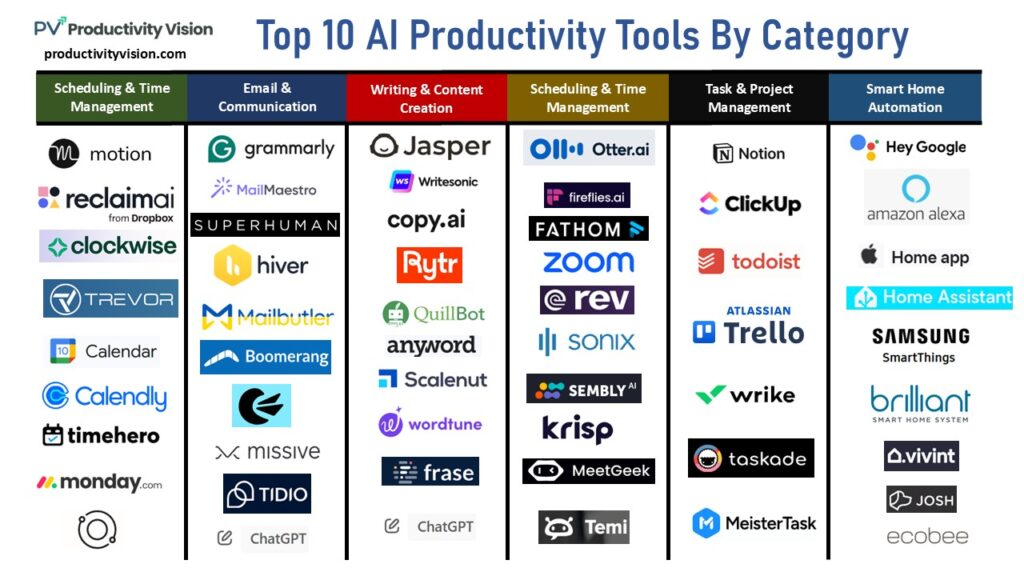
Credit: productivityvision.com
How To Choose The Right Ai Tool For You
When picking an AI tool, start with your biggest pain points. Do you struggle with time management? Try Motion. If writing takes too long, Grammarly or Jasper AI can help. For team collaboration, Otter. ai and Fireflies. ai are great choices.
Here are some tips to help you decide:
- List your daily tasks. Identify where you spend the most time.
- Test free versions. Most AI tools offer free trials or basic plans.
- Check integration. Make sure the tool works with your current apps.
- Start small. Use one tool at a time and add more as you get comfortable.
Don’t be afraid to experiment. The best tool is the one that fits your workflow, not just the most popular one.
Practical Tips To Maximize Ai Productivity
Getting the most from AI tools takes practice. Here are some practical strategies:
- Automate repetitive tasks. Use tools like Zapier and Butler AI to save time on daily routines.
- Keep your data organized. AI tools work best with clean, clear information.
- Review AI suggestions. Always check output for errors or tone, especially when sending emails or reports.
- Stay updated. AI tools improve quickly. Check for new features or integrations every few months.
Remember, AI is a helper, not a replacement. Use it to handle routine work so you can focus on creative or strategic thinking.
Frequently Asked Questions
What Is The Best Ai Tool For Time Management?
Motion stands out for time management. It plans your day automatically, schedules tasks, and adjusts for changes in real time. If you like having a clear plan each day, Motion is a strong choice.
Are Ai Tools Safe For My Data?
Most major AI tools use strong security measures. However, always check the privacy policy before uploading sensitive information. For extra safety, avoid sharing confidential details unless the tool is trusted by your company or organization.
Can Ai Tools Help Non-native English Speakers?
Yes. Tools like Grammarly and ChatGPT are especially helpful for non-native speakers. They correct grammar, suggest better phrases, and make writing sound more natural. This builds confidence and saves time.
How Much Do Ai Productivity Tools Cost?
Prices vary. Many offer free versions with basic features. For example, ChatGPT and Notion AI have free plans, while tools like Jasper AI and Fireflies. ai charge monthly fees for advanced features. Always start with a trial to see if a paid plan is worth it.
Where Can I Learn More About Ai Tools?
A good resource for exploring and comparing AI tools is the Wikipedia page on Artificial Intelligence. You can find definitions, history, and links to more specialized sites.
With the right AI tools, you can turn busy days into productive ones. Try a few from this list and see how much time and stress you can save. The future of work is here—let AI handle the busywork while you focus on what matters most.