








Small Business SEO Tips That Can Boost Google Rankings And Organic Traffic
If you own a small business, you know how important it is to show up on Google. When your website ranks higher, more people find you. More visitors means more customers. But SEO can feel confusing, especially for beginners. Google changes its rules often, and big companies spend lots of money on their rankings. Still, smart small businesses can compete. With the right SEO tips, you can boost your Google rankings and get more organic traffic—even if your budget is small.
This guide is packed with practical advice that is easy to understand and proven to work. You’ll learn the best ways to improve your website, reach your target audience, and grow your business online. Whether you run a local shop, a service company, or an online store, these SEO strategies will help you stand out.
Why Small Business Seo Matters
SEO is not just for big brands. In fact, small businesses can benefit even more. When you optimize your website, you increase your chances of appearing in search results. This means people searching for your products or services will find you first.
Organic traffic is powerful because it’s free and targeted. These visitors are already interested in what you offer. According to a study by BrightEdge, organic search drives 53% of all website traffic. Paid ads and social media are useful, but organic traffic brings the highest quality leads.
Small businesses often serve local customers. Local SEO helps your website appear in searches like “near me” or “best plumber in [city]. ” This can make a big difference for your sales. Plus, many people trust organic results more than ads.
Keyword Research: The Foundation Of Seo
If you want to rank on Google, you need to use the right keywords. Keywords are the words people type into Google when searching. Finding the best keywords is called keyword research.
How To Find The Right Keywords
1. Think Like Your Customer
Imagine what your customers would search for. If you own a bakery, they might type “best birthday cakes near me” or “gluten-free bakery [city]. ”
2. Use Free Tools
Tools like Google Keyword Planner, Ubersuggest, and Answer the Public can help you see which keywords are popular and how hard they are to rank for.
3. Focus On Long-tail Keywords
Long-tail keywords are longer phrases, like “affordable web design for small business. ” They have less competition and attract more targeted traffic.
4. Check Your Competitors
Look at what keywords your competitors use. This can give you ideas and show where you can stand out.
Keyword Data Table
Here’s a table comparing popular keyword tools for small business SEO:
| Tool | Free Version | Keyword Suggestions | Difficulty Score | Local Data |
|---|---|---|---|---|
| Google Keyword Planner | Yes | Medium | No | Yes |
| Ubersuggest | Yes | High | Yes | Yes |
| Answer the Public | Yes | High | No | No |
Non-obvious Insight
Many small business owners forget to check seasonal keywords. For example, “holiday gifts” or “back to school deals” can bring extra traffic during certain months.

Credit: rankmath.com
Optimizing Your Website Content
Once you know your keywords, you need to use them wisely. Google cares about content quality. Your website should answer visitors’ questions and provide real value.
Best Practices For Content Optimization
-
- Use Keywords Naturally
Place your main keyword in your page title, headings, and early in the content. Do not overuse—Google will penalize “keyword stuffing. ”
-
- Write for Humans First
Make your content easy to read. Short sentences, simple words, and clear explanations help visitors and Google.
-
- Add Fresh Content Regularly
Update your blog or news section with new articles. Fresh content signals to Google that your site is active.
-
- Include Internal Links
Link to other pages on your site. This helps visitors find more information and improves SEO.
-
- Use Images and Videos
Visuals make your content more engaging. Add keywords to image alt tags for extra SEO.
Example Of Optimized Content
A local bakery could write a blog post titled, “How to Choose the Perfect Birthday Cake in [City]. ” The post uses keywords, answers questions, and includes photos of cakes. It links to the bakery’s order page and other cake-related articles.
Content Quality Table
Compare content types for SEO impact:
| Content Type | SEO Impact | Engagement | Update Frequency |
|---|---|---|---|
| Blog Articles | High | Medium | Monthly |
| Product Pages | Medium | High | As Needed |
| Videos | Medium | High | Quarterly |
| Infographics | Low | Medium | Quarterly |
Non-obvious Insight
Small businesses often ignore FAQ sections. Adding a FAQ page can answer customer questions and rank for “people also ask” queries on Google.
Local Seo: Reaching Nearby Customers
Local SEO is a must for small businesses. It helps you show up in searches with local intent.
Steps To Boost Local Seo
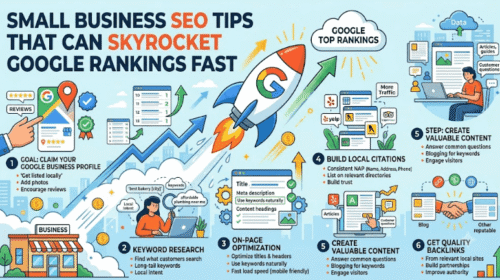
1. Claim Your Google Business Profile
Go to Google and claim your business listing. Fill in your business name, address, phone, hours, and website. Add photos and respond to reviews.
2. Optimize For Local Keywords
Use city or neighborhood names in your titles and content. For example, “plumber in Dallas. ”
3. Get Local Backlinks
Ask local newspapers, blogs, or business associations to link to your site. Local backlinks boost your authority.
4. Encourage Reviews
Ask happy customers to leave reviews on Google and Yelp. Positive reviews improve your ranking and trust.
5. Nap Consistency
Make sure your Name, Address, Phone (NAP) are the same everywhere online.
Local Seo Data Table
See how local SEO actions impact rankings:
| Local SEO Action | Ranking Impact | Difficulty | Cost |
|---|---|---|---|
| Claim Google Profile | High | Low | Free |
| Local Backlinks | Medium | Medium | Low |
| Reviews | High | Medium | Free |
| NAP Consistency | Medium | Low | Free |
Non-obvious Insight
Many small businesses forget to update their hours during holidays or special events. Incorrect hours can lead to lost customers and bad reviews.

Credit: www.salesforce.com
Technical Seo: Making Your Website Easy For Google
Technical SEO means making your site easy for Google to read and index. If your website has errors, Google may not show it in search results.
Key Technical Seo Tips
-
- Mobile-Friendly Design
Make sure your site works well on phones and tablets. Over 60% of searches are now mobile.
-
- Fast Loading Speed
Google favors fast sites. Compress images, use caching, and avoid slow plugins.
-
- SSL Certificate
Secure sites (HTTPS) rank higher. Get an SSL certificate for your site.
-
- Clean URLs
Use short, clear URLs. For example, www. mysite. com/services, not www. mysite. com/page? id=123.
-
- XML Sitemap
Create a sitemap and submit it to Google Search Console. This helps Google find all your pages.
-
- Fix Broken Links
Remove or update any links that don’t work. Broken links hurt your SEO.
Example: Mobile Optimization
A dentist’s website that is easy to use on a phone will get more visitors and higher Google rankings than one that only works on desktop.
Non-obvious Insight
Many small businesses skip image compression. Large images slow down your site. Use tools like TinyPNG to reduce image size without losing quality.
Link Building: Growing Your Website Authority
Links from other websites are like votes. The more high-quality links you have, the more Google trusts your site.
Link Building Strategies
1. Create Shareable Content
Write articles, guides, or infographics that others want to share and link to.
2. Guest Posting
Offer to write articles for local blogs or business sites. Include a link back to your site.
3. Engage In Community Events
Sponsor or participate in local events. Ask organizers to link to your site.
4. List Your Business In Directories
Submit your site to trusted directories like Yelp, BBB, or local chamber of commerce.
5. Build Relationships
Connect with other small businesses and propose link exchanges when relevant.
Link Quality Vs. Quantity
A single link from a trusted site (like a city newspaper) is better than many links from low-quality sites.
Non-obvious Insight
Don’t ignore local sponsorships. A link from a community event or charity site often brings both traffic and trust.
On-page Seo: Fine-tuning Every Page
On-page SEO means optimizing each page for specific keywords and user experience.
Key On-page Elements
-
- Title Tag
The title is the first thing Google and users see. Include your main keyword and keep it under 60 characters.
-
- Meta Description
This short summary appears in search results. Use keywords and make it attractive for clicks.
-
- Headings (H1, H2, H3)
Use headings to organize content and include keywords where natural.
-
- Alt Tags for Images
Describe your images for accessibility and SEO.
-
- Structured Data
Add schema markup (JSON-LD) to help Google understand your content.
Example
A plumbing service page might use the title “Emergency Plumber in Atlanta – Fast 24/7 Service. ” The meta description could say, “Need plumbing help in Atlanta? Call us anytime for quick, expert repairs. ”
Non-obvious Insight
Many small businesses forget to use schema markup. Schema helps your site appear in rich results like star ratings or FAQs. Free tools like Google’s Structured Data Markup Helper can assist.
Content Marketing: Attracting And Engaging Visitors
Content marketing means creating valuable information that attracts visitors and builds trust.
Effective Content Marketing Ideas
-
- How-to Guides
Teach your customers something useful. For example, “How to Fix a Leaky Faucet. ”
-
- Customer Stories
Share testimonials or case studies. Real stories build trust.
-
- Local News or Events
Write about what’s happening in your area. Connect with your community.
-
- Tips and Tricks
Offer simple advice related to your products or services.
Content Promotion
Don’t just publish—promote your content. Share it on social media, email newsletters, or ask partners to share.
Non-obvious Insight
Small businesses often skip video content. Videos can explain products, show behind-the-scenes, or answer FAQs. Even simple smartphone videos help.
Measuring Seo Success: Tracking Your Results
To improve, you must track your SEO performance. Google offers free tools to measure your results.
Tools For Tracking
-
- Google Analytics
See how many people visit your site, where they come from, and what they do.
-
- Google Search Console
Find out which keywords bring traffic, how your pages rank, and spot errors.
-
- Bing Webmaster Tools
If you get traffic from Bing, use this tool to track your rankings.
Metrics To Watch
-
- Organic Traffic
The number of visitors from search engines.
-
- Keyword Rankings
Where your site appears for target keywords.
-
- Bounce Rate
How often visitors leave your site quickly.
-
- Conversion Rate
How many visitors become customers or leads.
Non-obvious Insight
Check your mobile traffic separately. If most visitors use phones, focus extra on mobile SEO.
Common Seo Mistakes Small Businesses Make
Learning from mistakes saves time and money. Here are the most common SEO errors:
1. Ignoring Mobile Users
Many small sites look good on desktop but are hard to use on phones.
2. Keyword Stuffing
Overusing keywords makes content hard to read and can hurt rankings.
3. Missing Local Seo
Not claiming Google Business Profile or using local keywords means lost customers.
4. Broken Links
Outdated links frustrate visitors and lower SEO scores.
5. Slow Website
Slow sites lose visitors and rank lower.
6. No Fresh Content
Stale websites lose search ranking over time.
Non-obvious Insight
Many businesses forget to check their competition regularly. If your competitors update their SEO, you must keep up.
Advanced Seo Strategies For Small Businesses
If you’ve covered the basics, try these advanced strategies:
-
- Voice Search Optimization
More people use voice assistants. Optimize for phrases like “where can I buy pizza near me? ”
-
- Featured Snippets
Structure your content to answer questions. Aim for Google’s “featured snippet” box.
-
- Local Link Outreach
Reach out to local bloggers or influencers for links.
-
- Content Clusters
Group related articles together. This helps Google understand your site’s topic.
Non-obvious Insight
Monitor Google Trends for emerging keywords. New trends can bring fast traffic if you act early.
Staying Updated: Seo Changes And News
Google updates its algorithms often. What works today may not work tomorrow.
How To Stay Informed
-
- Follow SEO Blogs and News Sites
Websites like Moz, Search Engine Journal, and Google’s official blog share updates.
-
- Join Local Business Groups
Share SEO tips with other business owners.
-
- Attend Online Webinars
Learn from experts and ask questions.
-
- Experiment and Test
Try new strategies and measure results.
Non-obvious Insight
Don’t ignore Google’s official announcements. They often give hints about new ranking factors. For more details, visit the Google Search Central Blog.

Credit: kinsta.com
Frequently Asked Questions
What Is The Fastest Way To Improve Google Rankings For A Small Business?
The quickest way is to claim and optimize your Google Business Profile. Add correct information, photos, and ask customers for reviews. Also, optimize your website for local keywords and fix technical issues. Results may appear in a few weeks.
How Many Keywords Should I Target On Each Page?
Focus on one main keyword and 2–3 related keywords per page. Too many keywords can confuse Google and lower your ranking. Make sure keywords fit naturally in your content.
Does Seo Require A Big Budget?
No, you can do most SEO tasks yourself for free or low cost. Use free tools, write your own content, and focus on local SEO. Paid services can help, but are not required for good results.
How Do I Know If My Seo Is Working?
Track your organic traffic, keyword rankings, and conversion rate using Google Analytics and Search Console. If these numbers improve, your SEO is working. Check monthly and adjust your strategies as needed.
Can I Rank Higher Than Big Companies?
Yes, especially for local searches or long-tail keywords. Focus on your niche, provide high-quality content, and use local SEO. Small businesses can beat big brands in specific areas if they are strategic.
Bringing It All Together
SEO is a journey, not a quick fix. For small businesses, even simple changes can make a big difference. Start with keyword research, optimize your website content, and focus on local SEO. Make sure your site is mobile-friendly, loads fast, and has fresh content. Build quality links and measure your progress. Avoid common mistakes and stay updated with Google’s changes.
Remember, you don’t need a huge budget or expert skills to boost your Google rankings. With patience and smart strategies, your small business can grow online and attract more customers. Every improvement adds up. Start today, keep learning, and watch your organic traffic rise.